Ashford Ball Winder (Troubleshooting Guide)Updated 4 months ago
Ashford E-Ball Winder Troubleshooting Guide
The Ashford E-Ball Winder is awesome and should work great. However, if you do have any issue here's a quick troubleshooting guide to follow.
Here is a checklist to work through to help us identify the issue.
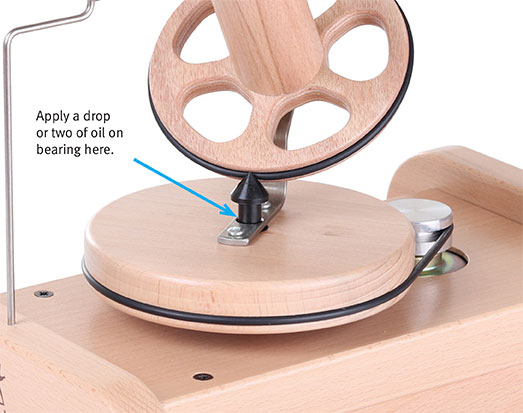
1. Unplug the power cord, remove the drive belt, does the flywheel move up and down freely on the metal drive shaft?
a. If yes, proceed to next test.
b. If no, apply a drop of oil to the bearing – see attached image (oil-ebw.jpg)
2. Lift the flywheel up so the base of the cone is not touching the metal drive cone and give it a spin by hand – see video (EBW-spinning-freely.mp4) attached – does the cone spin freely?
a. If yes, proceed to next test
b. If no, check for yarn wrapped around the base/bearing of the cone
Video Download - Eball Winder Spinning Freely
3. With the drive belt still removed and the flywheel back in place, give the flywheel a spin with your hand – see video (EBW-spinning-freely.mp4) attached - does it spin freely?
a. If yes proceed to next test
b. If no, check to ensure there isn’t any yarn caught around the bearing underneath. If after lubrication (from step 1) it is still tight we may need to replace the flywheel.
Video Download of Slow Speed Cone Spinning
4. With the drive band replaced, and the power cord plugged back in. Place a strip of cardboard in the groove at the top on the cone and turn the winder on at a slow speed – see video (EBW-cone-spinnig.mp4) attached - does the cardboard move up and down?
a. If yes and your winder still is not working correctly please get in touch with us again.
b. If no, remove the cone drive band and wipe it with a clean cloth also wipe the drive cone.
If you're still having issue please give us a call or live chat and we'll move forward with further troubleshooting or a replacement/repair if appropriate. 1-888-320-7746.